McpManager: a control plane for Model Context Protocol servers
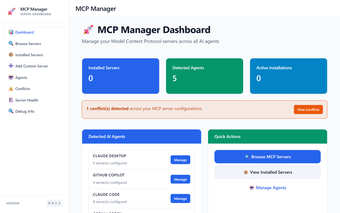
McpManager, created by JerrettDavis, is a management platform that centralizes Model Context Protocol server administration to reduce configuration overhead and manual file edits. The app provides a visual control plane that abstracts JSON configuration, letting developers shift focus from infrastructure tasks to building MCP-integrated workflows. Key components include agent-agnostic syncing, a modular clean-architecture codebase, and cross-platform deployment options. It targets AI developers, software engineers, and power users who need fewer manual configuration steps and faster integration.
What tasks can you actually use the app for?
The app functions as a central control plane for MCP servers and handles concrete operational tasks: discovery of ecosystem endpoints, installation without direct JSON edits, runtime monitoring, and lifecycle operations such as starting, stopping, and updating servers. It also exposes managed fields for credentials and API keys, so teams can coordinate multiple agent connections during testing, rollout, or local development.
How reliable is its configuration and extension model?
Abstracting manual JSON reduces the likelihood of configuration mistakes tied to hand-edited files. The project separates presentation, domain, and infrastructure layers using a clean architecture, which supports adding integrations with less core rewiring. Consistency features aim to keep configurations aligned across clients, but final reliability depends on the accuracy of discovered server manifests and the health of external MCP endpoints.
What file and deployment inputs does it accept?
The app runs on Windows, macOS, and Linux and supports deployment as a desktop application, a standalone web service, or within a Docker container. Primary inputs are MCP server endpoints and their configuration metadata; environment variables and API keys are handled through managed fields rather than stored as plaintext JSON. The discovery and install flows rely on properly formed server manifests from the ecosystem.
Is it practical to adopt in developer workflows?
The tool is designed for integration across MCP-compatible ecosystems and lists compatibility with clients such as Claude Desktop and Cursor, plus IDEs and headless agents. Server discovery and lifecycle controls make coordinated rollouts possible for teams that operate multiple agents. Adoption suits development teams that can extend a modular codebase; non-developer users may still require assistance to implement custom integrations or complex deployments.
Final assessment: practical foundation with community backing
The app is a practical choice backed by an open-source repository maintained by the developer, enabling public audits and community contributions. That public codebase and positive reception in the MCP developer community make adoption easier for teams that can extend tooling. Teams expecting a fully managed, non-technical product should plan to handle customization and operational decisions internally; community audits accelerate issue discovery and peer-reviewed extensions.
Pros
Centralized dashboard that avoids manual JSON file edits
Supports desktop, web, and Docker deployments
Manages environment variables and API keys securely
Laws concerning the use of this software vary from country to country. We do not encourage or condone the use of this program if it is in violation of these laws. Softonic may receive a referral fee if you click or buy any of the products featured here.